Data Cloud Automation Stack
Building an Automation Stack with Snowflake
Have you ever wanted to have access to all the data that is relevant to your org, and dream that you could build some automation based upon that data? What if you could ship all of your IT and Systems data to a single platform, query that data, then take action based upon the query results? If you have worked in IT long enough you have likely thought about this to some varying degree. Thinking about mundane labor heavy tasks that you know the root cause and the fix for, but just have not had the time nor the resources to build something meaningful to automate it all?
Well folks, I’d like to share a story with you all on how we accomplished these feats on my team.
How To Get Started
My data journey has been well over a decade long by now, maybe even closing in on two decades. It all started many years ago while trying to figure out how to get systems to talk to each other and leverage the data. It started with me using relational databases like Postgres and MySQL. I would write simple scripts that would take data from a source and dump them into database tables. Later at another previous job I stood up an ELK Stack. Now at my current place of employment we use our Data Cloud Platform, Snowflake.
In the beginning I did not know exactly all the use cases I would have with the data. I did not have a 10-year roadmap. I was unsure of all the workflows I could create as well. What I did know is that data was scattered across many systems, and the first order of business would be to centralize that data, then figure out what I could do with it all after.
So, it is completely okay and normal to not know what you will do long term with the data at first. You really need to just get your hands on all the data and play around with it. Then the ideas will flow like the Spice from Dune!
Our Goals
When I first started at Snowflake I really wanted to build what I was calling at the time “A Rules & Workflow Engine.” The concept was simple, have tons of data pouring into our platform, write queries to detect known issues, do API calls to IT tools to automate known fixes for known issues. What a lot of IT Tools lack, is a continuous data loop with data outside their tools, that also have an easy way to just fix complex, but known issues. Also, if your IT tools break, then you wouldn’t always have an easy path to apply a fix. In your IT tools stack you also likely have specific tools for Windows, macOS, mobile devices, Linux, VDI, and all the other technology you leverage that makes up your entire IT Stack. So, you end up with heavy labor efforts, duplication of work across siloed systems, and a lack of the full context without data from other systems.
So, about a year ago I challenged my team to build us a Cloud Automation Stack, that did exactly all of this and more!
Over the past year my team fully delivered this concept, and we now have it in production running several fully autonomous
remediation workflows, with logging and data of results.
I am very proud of my team’s accomplishments around this tech stack we have built, and I am now sharing it with the rest of the world.
Architecture and Design
We always strive to design things that scale, are secure, modular, and build a good developer UX so engineers can more easily contribute to the overall project. Security must be a part of any systems design, and when you do it right the security features can expand into more use cases. We are also a cloud first company, so everything will be in the cloud. This gave us a pretty good starting point to build upon and iterate over as the project went from R&D all the way to production rollout.
I started to outline some requirements like these:
- Must use server-less compute wherever possible
- We don’t want to be in the business of patching servers
- Leverage mTLS wherever possible
- We don’t want to deal with secrets, passwords, and want a straight forward way to authenticate a client
- Use a Unix-like approach, build one thing and build it well
- When creating API endpoints in the Lambda stack, ensure you create an API for a specific purpose
- Build it in a modular way that doesn’t “paint us into any corners”
- Avoid vendor lock as much as we can
- Use tools and develop workflows that are independent of our MDMs, security tools, etc
- If we ever need to change our tools, we can simply bring this stack with us to our new tools
My team went to work and started to design the architecture of this stack. In the below diagram is an abstracted simplified version of our architecture. So, view this diagram as more of a concept than a production ready design.
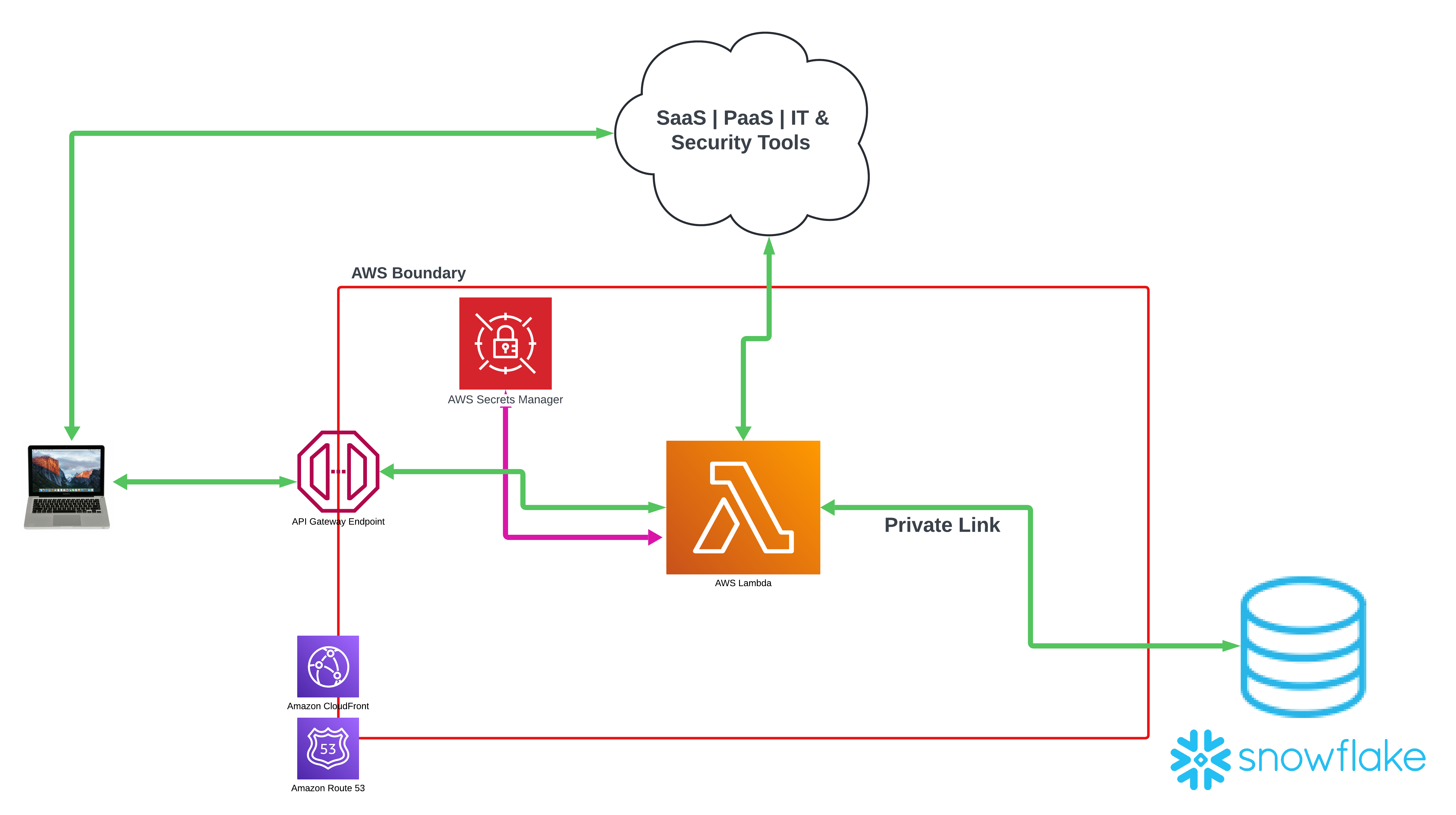
High level overview:
- API Gateways at cloud edge boundary for mTLS auth
- CloudFront CDN & Route 53 for content distribution and DNS
- Lambda Application stack
- Each flow will have its own API
- Example:
remediate_jamf_agentcould be an API we call to trigger a flow that will use Jamf’s re-enrollment API
- Example:
- Need new functionality? Add an API to this app stack
- Each flow will have its own API
- Secrets Vault
- Used for API calls to SaaS | PaaS | IT & Security Tools
- Snowflake via Private Link
- Traffic does not go over the open web
- Can execute external functions within Snowflake to interact with the Lambda API stack
- Lambda can write back into Snowflake over private link
- We can log results, update tables, declare states, etc
There is much more we could dive into, but I will save the deep dives for when my team is able to go do conference talks on this stack. This should give you a very basic idea of what we are accomplishing here.
Real World Security Benefits at Scale!
Ironically, one of the problems this stack solves is the epic battle most IT professionals have with using credentials in scripts. There are many times you are actually put into a bad spot, where you must embed credentials into a script due to the tech you are working with only has a REST API to automate the task you want to automate. Let’s take a look at security agents. Many security agents these days have a feature around “Tamper Protection.” Simply meaning that the agents on disk are immutable, and cannot be tampered with. Sounds great on paper right? However, when that security agent gets stuck, breaks, put into an unusable state, or perhaps even a vendor bug you might be put into a position where the only way to automate fixes is to call that agent’s REST API.
We did exactly this with our EDR agent! Now first and foremost to give our vendors some credit, we only see about a 1% or less failure rate on most agents we deal with here. However, 1% of 1,000 systems is 10 systems. 1% of 10,000 systems is 100 systems. So, as your org grows and scales, this problem becomes much harder to solve by having IT support handle them by hand. Tamper Protection typically has some sort of secret key you can get and pass to the agent to unlock the tamper protection. This is key, because tamper protection also typically prevents you from installing the agent over itself as a fix, or prevents you from uninstalling and then reinstalling the agent as a fix. These are common known IT troubleshooting flows. If the agent is broken, have you tried reinstalling it?
So, now with our mTLS gateway, we can store API creds in our secrets vault in the cloud, and have the client talk to our Lambda stack instead. Thus, never ever having to put API credentials in a script client side ever again. The client will use the mTLS certificate to talk to the Lambda stack via a workflow script. The Lambda API endpoint will be designed to fetch the secrets from the vault, talk to the EDR cloud application, and then return the tamper protection secret to unlock the agent, so we can perform an uninstallation and reinstall.
We can reuse this workflow for any REST API we want a client to communicate with. We do not have to put any credentials in scripts ever again! We just make sure the client interacts with the API Gateway, can pass some simple parameters to an API endpoint, and then have all the logic in the Lambda to do the actual work. Finally, to have the Lambda return the thing we wanted the client to do back to it. This is an omnidirectional architecture. The inverse of this is true as well, as we can have queries run in Snowflake that call the Lambda stack via external function, which in the end will talk to our MDM and can now potentially put end user devices in scope of an MDM workflow.
What If Your MDM Breaks?
We do consistently see about 1% of our macOS fleet end up in various states where the MDM or the binary is broken or
stuck. This breaks our ability to execute a lot of our script based workflows. Now this is no longer a problem. We get
webhook data every time a device checks in and/or submits inventory to our MDM. When we detect a client device has not
sent these specific signals of telemetry over n number of days, we now consider that agent to be in a broken state.
The Automation Stack can now run a job where it grabs every serial number of every macOS device that is in this state, passes them to the Lambda API stack, and from there we can make API calls back to our MDM to use their “automatic re-enrollment API,” which in returns automates the re-enrollment of a broken MDM client and putting it back into a working state. This is fully autonomous, with data coming into Snowflake from many sources of truth, executing queries that logically figure out what systems are in a broken state, then tells our Lambda stack to run the re-enrollment flow on them.
Data Visualization Comes Out of the Box!
As an IT professional, you have likely at some point in your career built an amazing under-the-hood automation workflow that is 100% transparent to everyone around you. Silent automation can solve so many problems at scale, but how do you socialize this major success with others? Do you show them a log file? Do you just tell a story about it? Likewise, how do you monitor how your automation is running, and how do you determine what ROI you are getting from it? Data visualization literally is the answer to this problem!
I asked the lead engineer on this project to build some data visualization around this, so we could monitor it, share the awesomeness of my team’s accomplishments, and showcase the work to folks that are not domain experts on end user device management. He delivered, lets take a look at some screenshots of our data application we built in Streamlit
Figure 1.
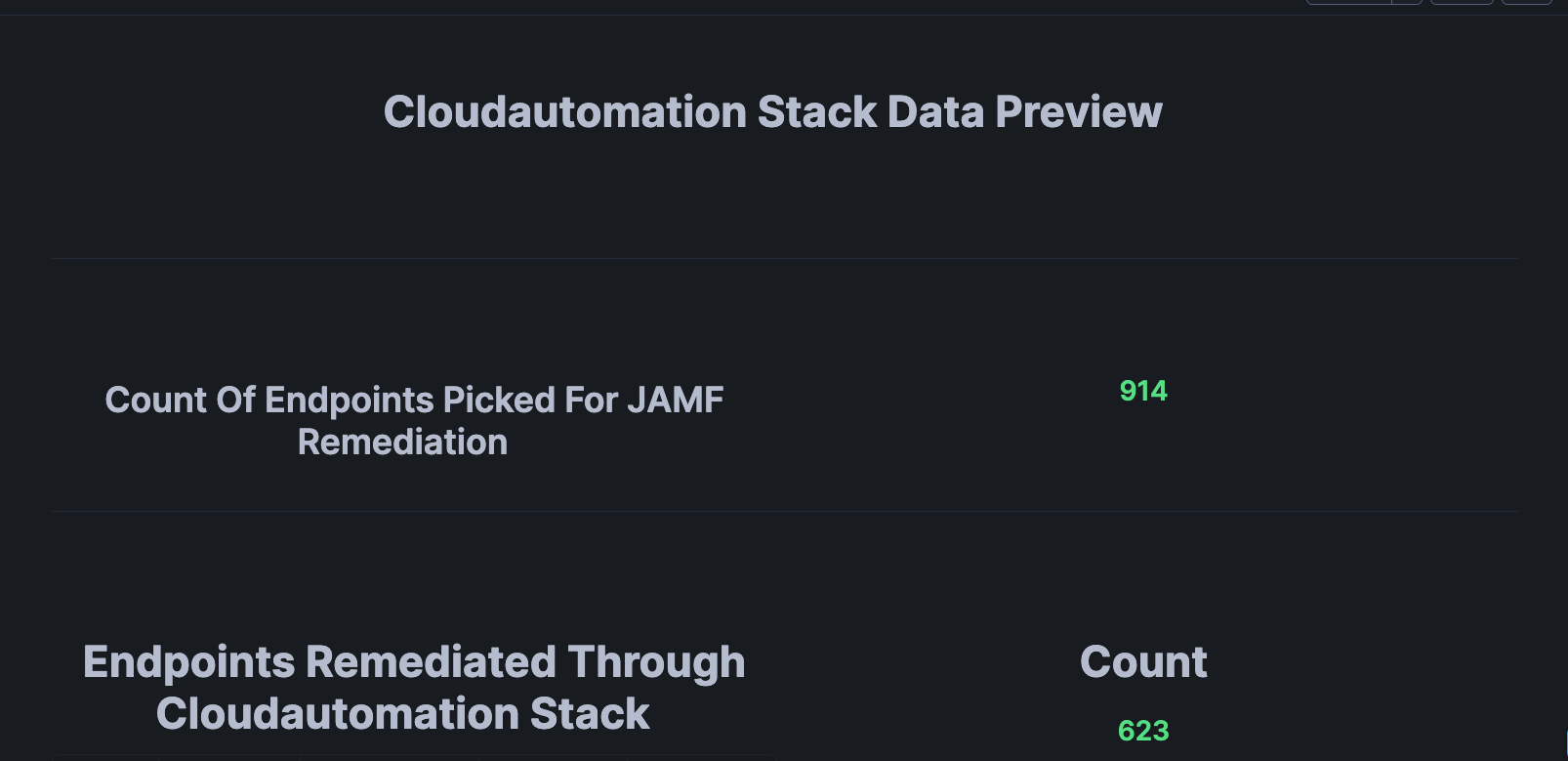
In the above screenshot we can observe a basic high level overview displaying the total lifetime number of endpoints we have detected with a broken MDM client and/or binary. Then the number below it is the total number of endpoints we have completely fixed with silent automation.
Figure 2.
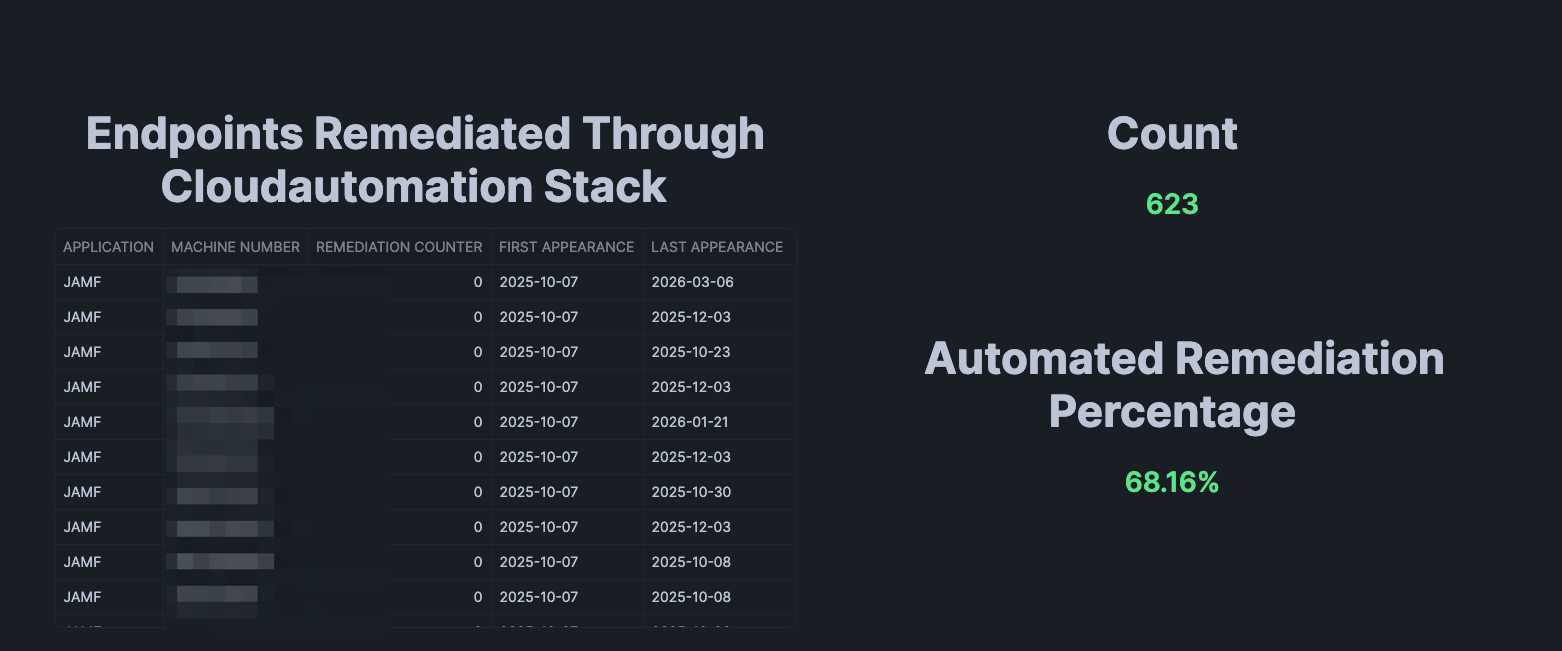
This part of the data visualization outlines the devices that have been automatically fixed with our data powered
automation, and the total percentage that automation has fixed. So, through the lifetime of this stack we have detected
914 total endpoints that got into a broken state, and the automation has fixed 623 of them. With the end result being that
68.16% of them were fixed with zero human interaction.
Figure 3.
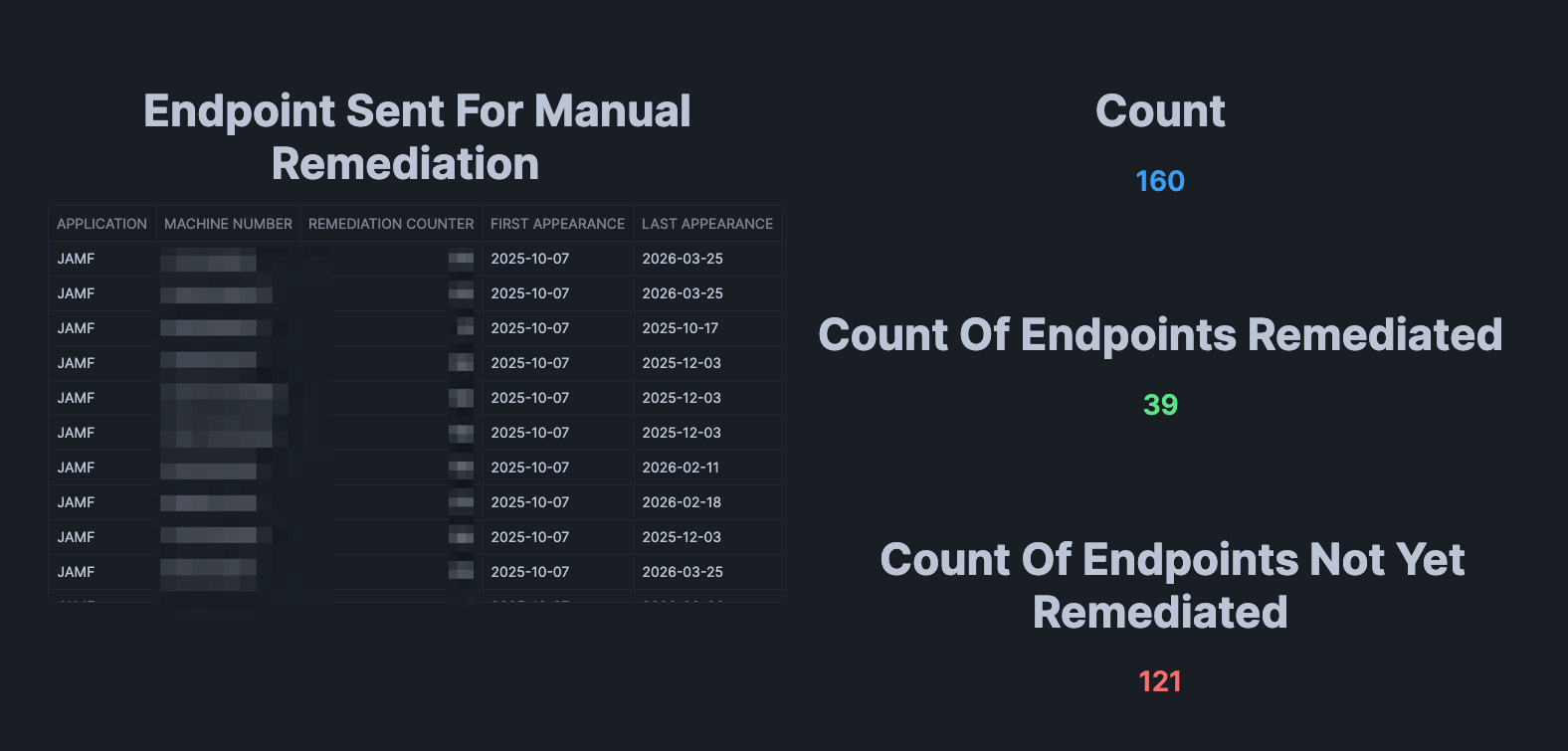
In this visualization we can see the devices that were not able to be automatically fixed with automation. This is likely due to some weird edge case, or the system is just in such a bad state it likely needs a reboot, or maybe even some IT support troubleshooting. For these cases our Cloud Automation Stack can automatically talk to our service desk system and generate support tickets for a human to take over and troubleshoot. So, again we are leveraging automation for when the automation fails. When we get into this state, our Cloud Automation Stack will know to instead of trying to fix the device to cut a support ticket instead so a human can take over and look at it.
How this works is that the Lambda Application stack keeps track of how many times it attempts to fix a broken MDM agent
on each device, and then after n number of failed attempts it just switches to another workflow of automatically
opening a ticket with our help desk.
Figure 4.
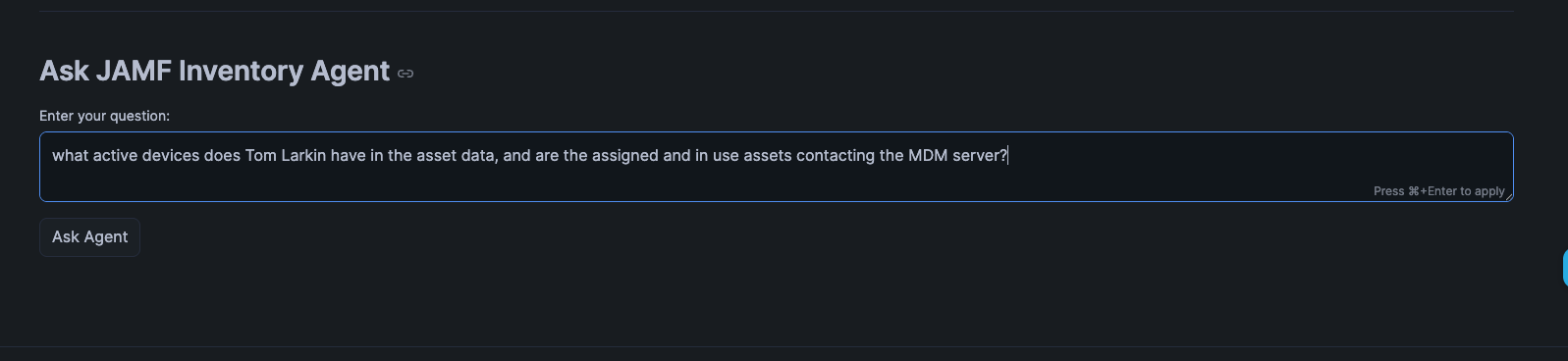
In the age of AI we are also starting to implement AI workflows into our work, and also into this Cloud Automation Stack. Keep in mind this is somewhere inbetween a POC and an MVP 1 for the AI features. This allows users of the data app to prompt it with natural language to get results. I simply asked it to display my active devices in the data. Which when you see the results, this definitely needs a bit more tweaking, but the basic core functionality is there today.
Figure 5.
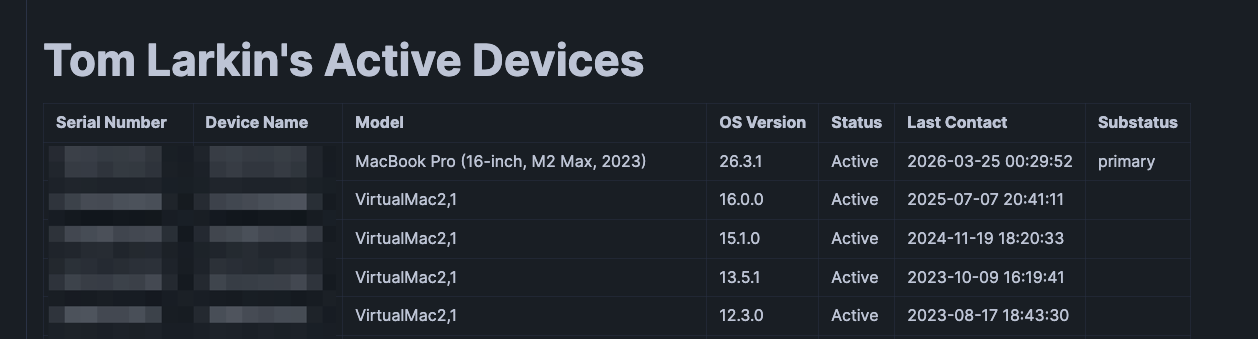
This is the output from the prompt. The AI integration in Snowflake took my prompt, processed it, dynamically built the query
for it, and then displayed the results. The thing we need to tidy up here is you can clearly see only one device is actually
active in the asset data. The other devices are actually old Virtual Machines I had created to test beta versions of
macOS and are old. So, I need to either reword my prompt better, or tweak our AI configurations to look at data more
precisely. We are actively integrating AI workflows and tech into our stacks and this is the beginning of that journey.
Figure 6.
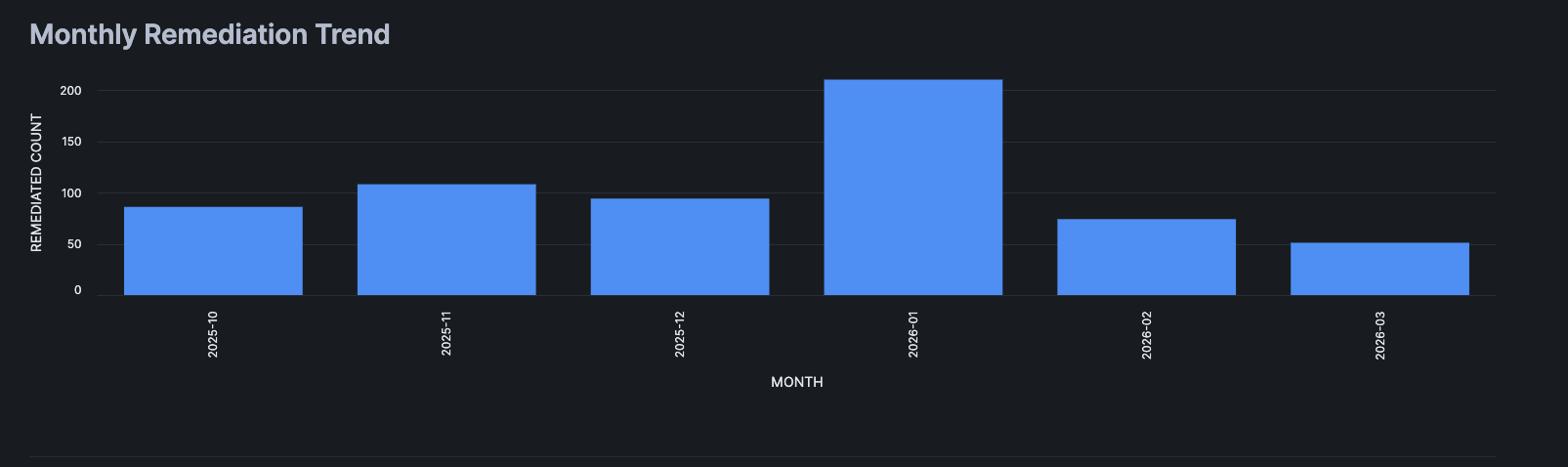
We also have some good old-fashioned monthly trends visualized. As you can observe a ~1% failure rate across the board each month or so is pretty consistent. With the caveat of January 2026, which we honestly feel needs more investigation as we suspect a lot of those were false positives due to people taking PTO on top of their normal time off during the holidays. We did account for this, but most likely our initial logic had some gaps in it. The great thing is the data clearly tells us to go investigate and reiterate over what we have built to improve it.
Since Snowflake comes with Snowsight and Streamlit out of the box you can easily visualize your data. This means IT teams can now showcase all their silent back end automation they build, visualize it to gain insights, trends, and so on. This is something IT teams have likely complained about over years when they don’t get the recognition for their hard work. Now you can visualize the work, put it into dashboards, data applications, and AI tools to allow everyone outside of IT see your hard work and the returns on it.
AI VS Automation
This topic was the catalyst for a great conversation I had with my peers in the Mac Admins Slack community. We all discussed in-depth our views on this very subject. We also all tended to agree with each other for the most part. Where I have ended up on this debate is that there is no golden answer for this. You can use one or the other, or you can even use both. It all just depends on what is contextual and relative to what you are trying to solve. Here is a table of some topics and data points where I think people can start when trying to figure out if they want to use automation, or they want to interact with AI.
| End Goal or Process | Notes | AI Use Case | Automation Use Case |
|---|---|---|---|
| Transparent UX | Workflows that are 100% invisible to the end user | Not preferred, there is no human interaction | Preferred, for silent and transparent automation |
| Fix known issues | Workflows that have known problems and known solutions | Not preferred, if the fix is known it can be likely a simple workflow to fix | Preferred, since we know the fix for the problem |
| User interaction | Workflows that require user interaction | Preferred if user input is largely dynamic, especially with natural language | Preferred if the user input is static, i.e. input menus, CLI, etc. |
| GitOps | Leveraging GitOps, CI/CD, dev work | Preferred for labor savings, shifting simple tasks to AI, generating greenfield code | Preferred for operations, to run what the AI builds, also automate interacting with the AI |
| Troubleshoot unknown issues | Encountering a new problem you do not know the fix for | Highly preferred, AI can likely figure it out faster than a human | Not preferred, difficult to automate unknowns |
| Interacting with data | Any workflow or time when a human or an automation interacts with data | Preferred when user needs to interact dynamically with the data | Preferred when systems interact with data that has established known outcomes/fixes |
| Writing Code | Any workflow that requires a human to write code | Preferred for greenfield, use with caution on brownfield | In this case Automation isn’t mutually exclusive to AI, you want to automate what you build |
| MDM & Device Management | Working within the MDM and device management tools stacks | Not preferred. Honestly, no AI does this well at all, and all my attempts to leverage AI here have far less return in comparison to other things | Prefer automation here for MDM stuff, along with GitOps integration |
There are many more topics we can cover on this, but I will stop here. Otherwise, I will be writing this blog for years! The main takeaway here is that there is no magic answer for AI vs Automation, as they aren’t exclusive from one another. In fact, you can use both! You can even use them together. It should always be what is the best solution that is relative and contextual to the problem you are trying to solve. Different Orgs will have different needs and requirements. Thus, there will also be zero universal answers. Where AI lacks on things today, we just write automations and build processes and workflows for. Where AI can one shot something, or heavily mitigate the labor use AI for those things.
As for the Cloud Automation Stack, it is a combination of both AI and Automation. We use AI to build the automation, and we build agentic AI for end users to interact with the data, but the core loop we have created is ultimately one big automation pipeline.
So, in the end automation is always something you want to accomplish, and AI can augment that where AI works very well. However, always be mindful of trying to force something as a solution. It doesn’t have to be one of or the other either. It can clearly be both. The integration AI agents into our data apps has been a huge quality of life improvement for any human who is not a domain expert in device management. They can just use natural language to ask the application about the data in this stack. Don’t be afraid to try new things and get out of your comfort zone.